
Nigeria’s three biggest mobile networks — MTN, Airtel, and Glo — all let you transfer data to another number. The process is different on each network, which is where most people get stuck. This guide covers every method that works right now: USSD codes, SMS, and where available, the official apps.
How to Share Data on MTN Nigeria
MTN calls it Data Share or Data Gifting. You can send data to any MTN number, as long as you have an active data bundle on your line.
Method 1: USSD Code
Dial this code from your MTN line:
*131*2*1# (to share data)
Or use the direct format to gift a specific amount:
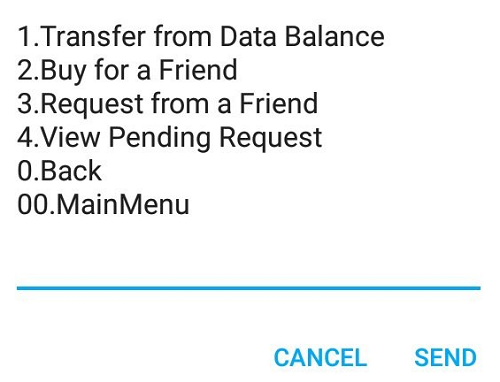
*131# → Select "Data" → Select "Transfer Data"
Follow the on-screen prompts, enter the recipient’s number, choose the amount, and confirm with your MTN data PIN. If you have never set a PIN, the default is 0000.
Method 2: SMS
Send a text message to 131 in this format:
Share [Amount in MB] [Recipient's number]
Example: Share 200 08012345678
MTN will send a confirmation SMS once the transfer goes through.
Method 3: MyMTN App
Open the MyMTN App, tap on Data, then Transfer Data, enter the recipient’s number and select the data volume. The app is available on Android and iOS.
MTN Data Share conditions to know:
- Only MTN-to-MTN transfers are allowed
- The gifted data expires based on the sender’s bundle validity
- Transfers are not reversible once confirmed
How to Share Data on Airtel Nigeria
Airtel calls this feature Data Gifting. It works for prepaid subscribers only — postpaid lines cannot gift data.
Method 1: USSD Code
Dial:
*141*712*0#
You’ll get a menu. Select Gift Data, enter the recipient’s Airtel number, choose the data volume, and confirm.
Alternatively, use the shorter format if you already know what you want to send:
*141*712*[Amount]*[Phone Number]#
Example: *141*712*100*08098765432# to send 100MB to that number.
Method 2: Airtel Thanks App
Open the Airtel Thanks App, go to Manage Data, tap Gift Data, enter the phone number and amount, then confirm. The app also shows your available balance before you transfer.
Airtel Data Gifting conditions:
- Airtel-to-Airtel only
- Minimum gift is 10MB
- Maximum gift per day is 1GB
- Both sender and recipient must be active subscribers
How to Share Data on Glo Nigeria
Glo’s version is called Glo Data Share. The USSD method is the simplest way to do it.
Method 1: USSD Code
Dial:
*127*01*[Recipient's Number]*[Amount in MB]#
Example: To send 500MB to 08123456789, dial:
*127*01*08123456789*500#
Glo will prompt you to confirm. Press 1 to approve the transfer.
Method 2: SMS
Text 127 with this format:
Share [Amount] [Recipient's Number]
Example: Share 300 08123456789
Method 3: Glo Café App
The Glo Café App has a data sharing option under the My Account section. Select Data, then Share Data, fill in the recipient’s number and the data amount, then submit.
Glo Data Share conditions:
- Glo-to-Glo only
- Your line must have an active data bundle with sufficient balance
- Shared data carries the same expiry as your bundle
Common Problems and Fixes
“Transaction failed” error on MTN: This usually means your Data PIN is wrong or not set. Reset it by dialing *131*4#.
Airtel says “insufficient data”: The minimum gift is 10MB. If your bundle balance is below that, you cannot gift.
Glo transfer not going through: Confirm the recipient’s number is correct and the line is active. Inactive Glo lines cannot receive data transfers.
Wrong number entered: None of the three networks can reverse a completed data gift. Double-check the recipient’s number before confirming.
Quick Reference Table
| Network | USSD Code | SMS Number | App |
|---|---|---|---|
| MTN | *131# → Transfer Data | 131 | MyMTN App |
| Airtel | *141*712*0# | N/A | Airtel Thanks App |
| Glo | *127*01*[Number]*[MB]# | 127 | Glo Café App |