
Running out of data mid-stream is one of those small frustrations that happens more often than it should. The fix is simple — you just need the right code or app for your network. Here is every method that works in 2025, organized by network, so you can bookmark this and stop guessing.
MTN Data Balance
MTN is Nigeria’s largest network, and it gives you three ways to check your remaining data.
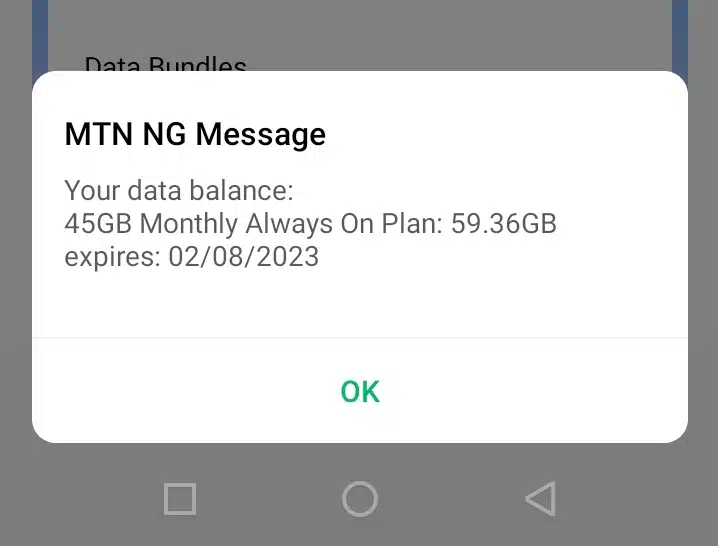
USSD Code: Dial *131*4# from your MTN line. A pop-up will show your active bundle, data left, and expiry date. No internet required — this works even with zero data.
SMS Method: Text 2 to 131. You will get an SMS reply within seconds showing your balance breakdown.
MyMTN App: Download the MyMTN app (Android or iOS), log in with your number, and check the dashboard. The app also shows bonus data separately from your main bundle, which the USSD code sometimes lumps together — useful if you are trying to track exactly what is left.
Quick tip: If you have multiple active bundles, *131*4# lists all of them in sequence.
Airtel Data Balance
USSD Code: Dial *140# and select the data balance option, or go straight to *140*1# for a direct data check.
SMS Method: Text BAL to 440. The reply shows your data balance and expiry.
My Airtel App: The My Airtel app (available on Android and iOS) gives a real-time view of your balance on the home screen. It also lets you buy data and activate offers without dialing codes.
One thing worth knowing: Airtel sometimes splits data into “main” and “bonus” buckets, and the USSD code shows both. The bonus data often expires faster, so keep an eye on those dates.
Glo Data Balance
USSD Code: Dial *127*0#. You will see your current data balance and expiry date.
SMS Method: Text Info to 127. The reply shows your active data plan and remaining MB or GB.
Glo Café App: The Glo Café app is available on Android and iOS. The app shows your balance on the dashboard after login and lets you recharge or buy more data directly.
Glo’s USSD response can sometimes be slow — if the first dial times out, try again. It usually works on the second attempt.
9mobile (formerly Etisalat) Data Balance
USSD Code: Dial *228# and select the data option from the menu.
SMS Method: Text STATUS to 229.
9mobile App: The 9mobile app (Android and iOS) shows your data, airtime, and plan details after you log in. Navigation is straightforward — the balance appears on the main screen.
9mobile’s subscriber base is smaller than the other three, but its network holds up well in many southern states. The USSD method is the fastest option here.
General Tips for All Networks
Check before your plan expires, not after. Most Nigerian networks send an SMS when your data drops below a threshold, but those alerts do not always come through reliably. Dialing the USSD code yourself takes five seconds and saves the frustration of hitting zero at the wrong moment.
Bonus vs. main data. All four networks separate “bonus” data (usually from promos or carry-over) from your paid bundle. Bonus data often expires sooner. Always check which bucket is draining first.
No data, no problem. USSD codes (*131*4#, *140*1#, *127*0#, *228#) work without an active data connection. They run over the voice network, so you can check your balance even when you have zero MB left.
Roaming abroad. If you are traveling, these USSD codes still work on MTN, Airtel, and Glo lines in most African countries — though response time varies by roaming partner.
Quick Reference Table
| Network | USSD Code | SMS | App |
|---|---|---|---|
| MTN | *131*4# | Text 2 to 131 | MyMTN |
| Airtel | *140*1# | Text BAL to 440 | My Airtel |
| Glo | *127*0# | Text Info to 127 | Glo Café |
| 9mobile | *228# | Text STATUS to 229 | 9mobile App |